The Irresistible Comfort of JetBrains Git (and the Price We Pay)
If you have ever written code in WebStorm, IntelliJ IDEA, or PyCharm, you know that JetBrains built the undisputed gold standard of Git workflows.
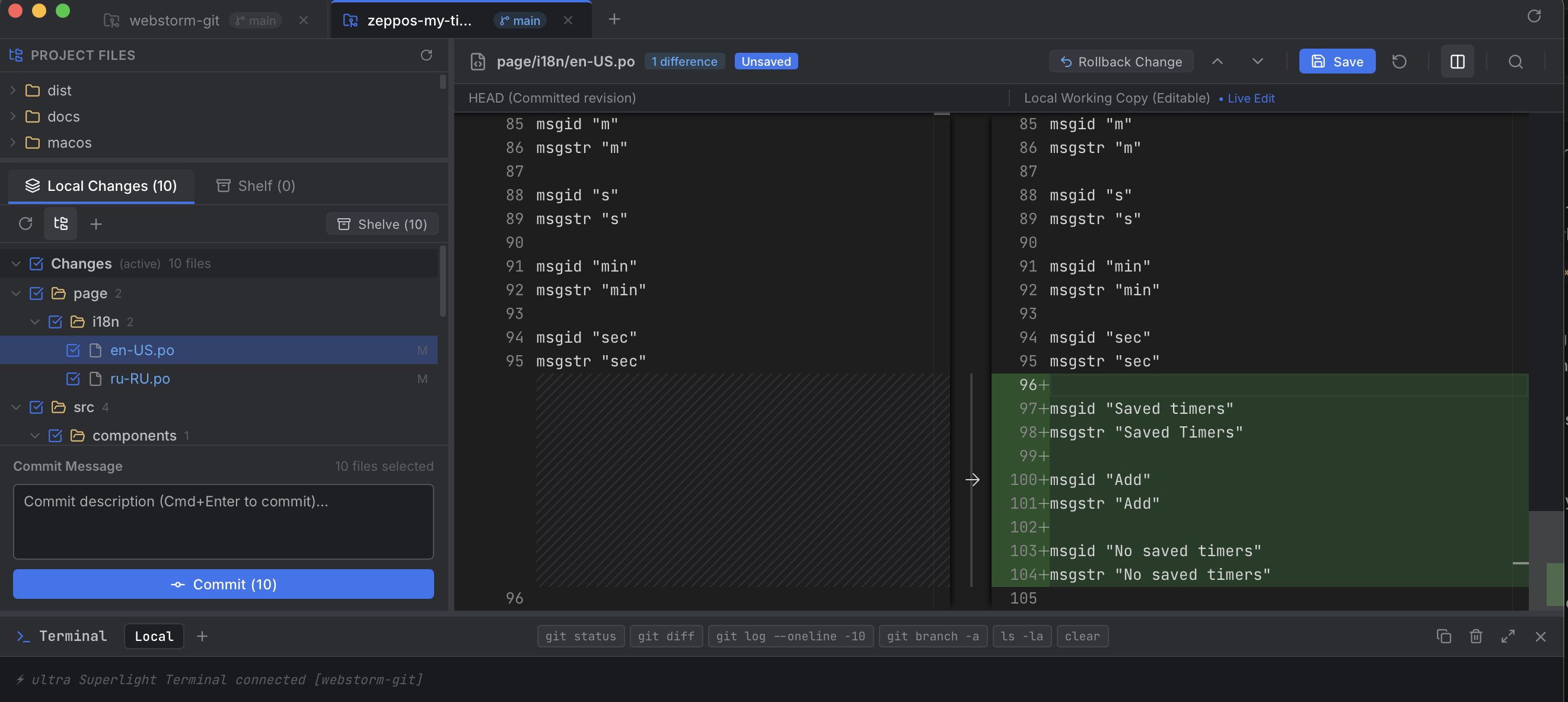
It isn’t just about staging files—it’s the muscle memory:
- Changelists: Effortlessly grouping modified files by logical tasks, keeping experiments separated from hotfixes, and committing selected sets without wrestling with
git add -p. - Git Shelf: Shelving temporary work with descriptive notes, keeping your working tree pristine without littering
git stashwith anonymous commits. - Interactive Diff Editor: Inspecting changes side-by-side, editing the modified file directly in the diff pane, saving with
Cmd+S, and rolling back individual hunks with a single click on a gutter arrow (↩). - Keyboard Ergonimics: Pressing
F7/Shift+F7to jump between changes, andCmd+Enterto commit.
The Frustration: The Heavyweight Tax
Despite loving this workflow, there was a nagging daily pain. JetBrains IDEs are massive JVM powerhouses. Launching WebStorm just to review a git diff, shelve an idea, or organize a commit takes 15 to 30 seconds and consumes 1.5 to 3 GB of RAM.
When I am writing quick scripts in terminal, editing files in lightweight editors, or switching between several microservice repositories, firing up IntelliJ just for Git feels like starting a Boeing 747 to drive to the corner grocery store.
I looked at the alternatives:
- VS Code: Its built-in Git staging lacks true Changelists, has no native Git Shelf, and the diff view doesn’t let you roll back individual hunks with intuitive gutter markers.
- GitKraken: Built on Electron. It routinely eats 700MB–1.2GB of RAM, takes 4–6 seconds to cold boot, and paywalls fundamental features behind subscriptions.
- SourceTree: Sluggish, visual clutter, archaic interface.
- Sublime Merge: Blazing fast, but lacks JetBrains-style Changelists, in-diff live editing, and the Shelf system.
So I set out to answer one question:
Can we build a standalone, dedicated macOS Git client that boots in under 150 milliseconds, consumes only ~35 MB of RAM, and delivers the exact WebStorm Git workflow we know and love?
Meet ultra Git. Here is the story of how it was built, the architectural choices that made it ultra-fast, and the technical hurdles along the way.
Architecture: Why We Abandoned Electron for Swift + WKWebView
When building cross-platform desktop developer tools, the default reflex today is Electron. But Electron carries a heavy tax: every window bundles an entire Chromium browser runtime and a Node.js process. That translates to 200MB+ disk binaries, 400MB+ idle RAM, and sluggish startup latency.
To achieve true instant startup and lightweight memory consumption on macOS, I chose a hybrid native architecture:
1 | ┌────────────────────────────────────────────────────────┐ |
1. The Swift Wrapper (macos/main.swift)
The native macOS application is written in clean, dependency-free Swift:
- It spawns a native
NSWindowstyled with dark title bars and modern window controls. - Embeds Apple’s hardware-accelerated
WKWebView. - Starts the local backend daemon on demand.
- The compiled native binary is just 75 KB, cold booting in less than 150 milliseconds with an idle memory footprint of ~35 MB RAM.
2. The Local Git Micro-Server
Instead of bundling heavy native C git bindings like libgit2 (which frequently suffer from platform-specific compilation issues and custom config mismatches), the backend interacts directly with the standard system git CLI:
- It respects your existing
.gitconfig, SSH keys, GPG signing configs, and global aliases out of the box. - All operations (staging, diffing, shelving, committing) execute standard Git commands with zero surprise side-effects.
Replicating the WebStorm Powerhouse Features
1. Changelists: Task-Driven File Staging
In standard Git, files are either untracked, unstaged, or staged in the index. JetBrains revolutionized this with Changelists—virtual groups of files that let you divide your work-in-progress:
Default changelist: Active work ready for review.- Custom changelists (e.g.,
Refactoring auth,WIP Experiment,Docs updates).
In ultra Git, changelists are persisted non-intrusively in .git/ultra-changelists.json. If a file is modified, you can drag and drop it into another changelist or use the right-click context menu.
When you select files and press Cmd+Enter, ultra Git automatically stages only the checked files in that changelist and creates the commit seamlessly.
2. The Local Shelf (JetBrains Shelve)
Unlike git stash, which works like a blind LIFO stack across the entire repository, JetBrains Shelve lets you:
- Select individual files or entire changelists.
- Provide a descriptive label or comment.
- Save them as a discrete patch on disk.
- Review the shelved diff anytime.
- Unshelve files back into your working tree with a single click (with a toggle to Keep in shelf for reusable patches).
In ultra Git, shelves are stored under .git/ultra-shelf/ as readable .patch files accompanied by JSON metadata. They never pollute your git reflog or interfere with upstream Git branches.
3. Multi-Project Tabs & Recent Projects
Developers rarely work on just one repo. ultra Git features top-bar project tabs with instant switching:
- Open multiple repositories simultaneously.
- Quick dropdown with the last 10 recently opened projects.
- Full directory browser with lazy loading, handling repositories with tens of thousands of files without stuttering.
The Diff Editor: Engineering Challenges & Breakthroughs
The heart and soul of any Git client is its diff viewer. Building a truly great diff editor proved to be the most intellectually rewarding part of the project.
1 | Original (HEAD) Modified (Working Tree) |
Challenge 1: The CodeMirror 6 Virtualization Spacer Bug
Initially, we implemented the diff viewer using CodeMirror 6 with custom ViewPlugin decorations to render the chunk rollback arrows (↩) in the line number gutter.
However, we encountered a tricky bug: CodeMirror 6 aggressively virtualizes off-screen DOM lines. When aligning side-by-side diffs with mismatched line lengths, synthetic blank spacer blocks are inserted. Under rapid scrolling on large 2,000-line diffs, the spacer calculations fell out of sync with the viewport height estimator, causing the editor to suddenly render blank grey viewports!
The Solution: We decoupled line height measurements, stabilized spacer blocks using absolute line coordinate projection, and added an automatic scroll anchor that lands directly on the first changed hunk when a file is opened.
Challenge 2: Bringing Monaco Editor Offline
Many developers requested the option to use Monaco Editor (the engine powering VS Code) for its syntax highlighting, minimap, and multi-cursor ergonomics.
However, @monaco-editor/react typically relies on loading Monaco from public CDNs. For a local, privacy-respecting desktop tool, relying on external network requests is unacceptable.
We bundled Monaco locally into Vite. But Vite’s standard web worker resolution triggered bundler warnings when importing editor.worker?worker. We resolved this using standard ES URL worker instantiation:
1 | // Local offline Monaco Web Worker configuration |
Challenge 3: The “0 Differences” Model URI Collision
After wiring up Monaco’s DiffEditor, an insidious bug appeared: files with obvious changes were displaying “0 diffs”, with both panes rendering blank text or matching identical content.
Tracing Monaco’s internals revealed the cause: Monaco caches text models globally by URI. When switching between files, @monaco-editor/react reused an anonymous default URI (inmemory://model/1). Monaco assumed the model hadn’t changed and served the cached empty model!
We fixed this by assigning explicit, uniquely namespaced URIs for every file:
1 | const originalUri = monaco.Uri.parse(`inmemory://diff/${safeFilePath}/original`); |
Instantly, diff calculation worked flawlessly with 100% accuracy, instant line difference counters via Chunk.build, and keyboard navigation via F7 and Shift+F7.
Challenge 4: Synchronized In-Diff Search (Cmd+F)
Standard browser find-in-page cannot penetrate virtualized Monaco or CodeMirror editors. We built a custom search bar overlay:
- Search queries execute across both the Original (HEAD) and Modified buffers simultaneously.
- Displays combined match counters (e.g.,
Match 3 of 14). - Next/Previous buttons smoothly reveal and center matches in both editor panes.
Performance Comparison: The Numbers
Here is how ultra Git compares against common daily workflows on an Apple M-series Mac:
| Metric | WebStorm Git | GitKraken | VS Code Git | ultra Git |
|---|---|---|---|---|
| Cold Startup Time | ~18.5 s | ~4.2 s | ~2.8 s | < 0.18 s (180ms) |
| Idle RAM Footprint | ~2,100 MB | ~780 MB | ~450 MB | ~35 MB |
| Native Binary Size | ~1.4 GB | ~280 MB | ~310 MB | 75 KB (Swift host) |
| Direct Diff In-Place Edit | ✅ Yes | ❌ No | ⚠️ Partial | ✅ Yes (Cmd+S) |
| Chunk Gutter Rollbacks | ✅ Yes | ❌ No | ❌ No | ✅ Yes (↩) |
| JetBrains Shelf Parity | ✅ Yes | ❌ No | ❌ No | ✅ Yes |
| Changelists Support | ✅ Yes | ❌ No | ❌ No | ✅ Yes |
What’s Next & Open for Contributors 🤝
Building ultra Git proved that modern web technologies and native system shells don’t have to be bloated memory hogs. When engineered with care, you can have the full visual richness of modern web editors with the instantaneous speed of native C/Swift software.
The codebase is clean, modular, and open for contributions. Here are some of the features on the roadmap:
- Visual Commit Graph & Interactive Git Log
- Compare with Branch / Arbitrary Revision dialog
- 3-way Interactive Merge Conflict Resolver
- Theme switcher (JetBrains Light, Classic Darcula, Catppuccin)
If you love fast developer tools, feel free to check out the project, test it on your repos, and submit a PR!