Resumes as Code: The Elegance of RenderCV
If you are an engineer or an academic, writing resumes in MS Word is a formatting nightmare, and custom LaTeX templates are often too verbose to maintain.
Recently, I stumbled upon a brilliant Python project called RenderCV. It allows you to write your resume content in a clean, structured YAML file and generates a beautifully formatted PDF with perfect typography using Typst under the hood. It treats your resume like code, which means you can version-control it, focus strictly on the content, and let the tool handle page margins, alignment, and styling.
However, RenderCV was designed primarily as a command-line interface (CLI) tool. Every time you make a change, you have to run rendercv render John_Doe_CV.yaml, check the output, open the PDF viewer, and check the alignment. If you make a validation or schema error, you have to read CLI compiler tracebacks.
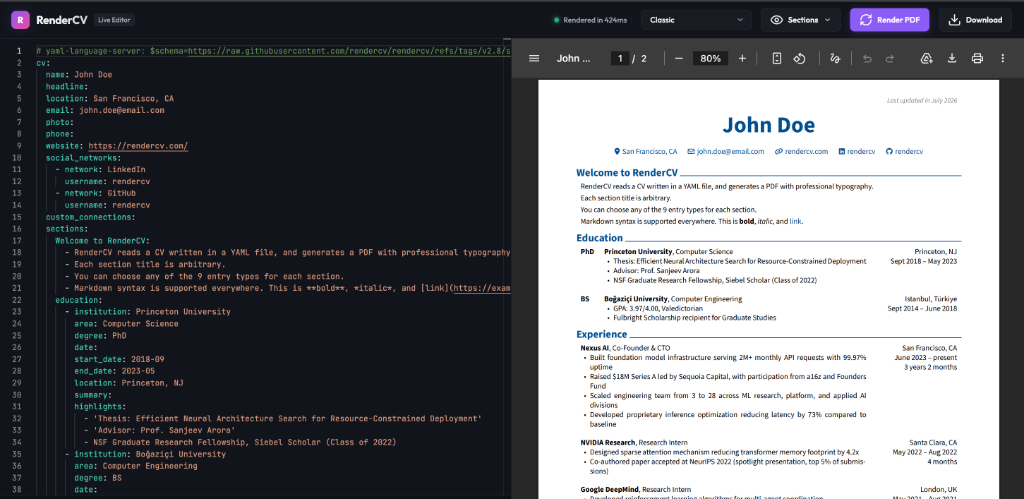
I wanted to bridge this gap by adding a Live Web Editor—a local single-page web app with a side-by-side Monaco editor, live PDF preview, instant schema validation, and interactive theme/section toggles.
With the help of Gemini, I successfully built and integrated this web interface directly into RenderCV! Here is how we did it.
The Tech Stack and Architecture
To keep the web editor lightweight, fast, and dependency-minimal, we chose:
- Backend: FastAPI + Uvicorn — perfect for writing high-performance APIs and serving static assets.
- Frontend: Vanilla HTML5 + Modern CSS + Javascript — avoiding bloated build steps (like Webpack or Vite) for a local CLI helper. We used the Monaco Editor (via CDN) for a VS Code-grade YAML writing experience and Lucide Icons for smooth visual elements.
- Rendering: RenderCV Python API — calling the library’s internal models directly to parse, validate, and build Typst and PDF documents in-memory or inside temp directories.
1. Designing the FastAPI Backend (web_app.py)
The core of the server is the /api/render endpoint. When the user types YAML in the web UI, the frontend sends it to this endpoint. The backend handles three major tasks:
- Rendering the PDF: We compile the YAML string using RenderCV’s internal compilation functions and return the raw PDF bytes.
- Section Visibility Toggling: RenderCV allows you to hide or show sections of your CV. We parse the incoming YAML, identify all available CV sections, strip any sections the user chose to hide in the UI dropdown, and compile the final document.
- Structured Error Mapping: When validation fails, RenderCV throws a
RenderCVUserValidationError. We intercept this error, extract the exact line and column numbers of the invalid YAML field, and return a clean JSON error response so Monaco can display red squiggly lines at the exact position of the error!
Here is how the /api/render endpoint looks in python:
1 |
|
2. A Premium Web Interface (index.html)
For the user interface, we wanted something that felt premium, responsive, and fully immersive. Gemini helped me code a beautiful modern layout featuring:
- HSL Dark Theme: Deep slate backgrounds, semi-transparent overlays (
backdrop-filter: blur), and vibrant purple linear-gradient accents. - Side-by-Side Splitscreen: Monaco Editor on the left, live PDF viewer (using an
<iframe>loaded with a local Blob URL) on the right. - Dynamic Controls:
- A Theme Switcher dropdown to load templates (classic, engineering, moderncv, etc.) and merge your current CV data into them automatically.
- A Sections Dropdown which queries the backend headers and generates checklists to dynamically hide/show resume sections (e.g. hiding “Projects” or “References” when exporting target-specific versions of your CV).
- An inline Validation Log console at the bottom of the editor that expands to show error details. Clicking on any validation error automatically highlights and focuses the line in the Monaco editor.
To compile, the user can either click the “Render PDF” button or use the keyboard shortcut Cmd + Enter. The PDF compiles in less than a second!
3. Wrapping it into the CLI (web_command.py)
To make it incredibly easy for users to start, we added a new command to the RenderCV Typer-based CLI:
1 | rendercv web |
This launches the local Uvicorn FastAPI server and opens your web browser automatically:
1 |
|
Reflections on Coding with Gemini
Building this feature with Gemini was exceptionally fast. What would have normally taken days of reading internal source code and configuring Monaco API configurations was solved in hours:
- Understanding the AST/YAML library: Gemini correctly identified that we should use
ruamel.yamlto parse the YAML file to preserve user quotes, comments, and structure when switching themes. - Error mapping: Gemini figured out exactly how to traverse
RenderCVUserValidationErrorcoordinates and construct the Monaco validation marker payloads (monaco.editor.setModelMarkers) so the editor is fully synchronized with Pydantic validation. - Polishing UX: It crafted CSS variables and layout offsets that look gorgeous, scale nicely across multiple screen resolutions, and are super responsive.
If you write resumes, go check out RenderCV—and try running rendercv web to experience the live editor yourself!
Happy coding!